Features

Everything you need to sound clear.
And to manage it at scale.

VocaClear pairs real-time, on-device AI noise cancellation with the admin tools teams need to roll it out securely.

Two AI engines

Pick quality or efficiency.
Switch any time.

Both engines run entirely on your PC. Choose the one that fits the computer, and set the strength to taste.

FeatherLite

Ultra-low CPU

A compact recurrent neural network that processes audio in 10-millisecond frames using very little processing power. It's ideal for older laptops and busy machines.

Quality
Very good
Best at
Steady noise like fans and hum
Processor
Almost any Windows PC
Best for
Older or low-power laptops

Four strength levels

Maximum removes the most. Gentle keeps a little of the room for a more natural sound. Toggle noise cancellation on and off instantly.

What it removes

Built for the noise of real life

VocaClear keeps the sound of your voice and removes the sounds that aren't speech.

Keyboards & mouse clicks
Fans & air conditioners
Traffic & car horns
Café & office chatter
Construction & drilling
Barking dogs
Doors & footsteps
Kitchens & dishes

A person speaking loudly right beside you is speech too. VocaClear reduces background chatter, but a nearby voice may still come through.

Works with any app that lets you choose a microphone

Admin dashboard

Roll out to your whole team
without the busywork

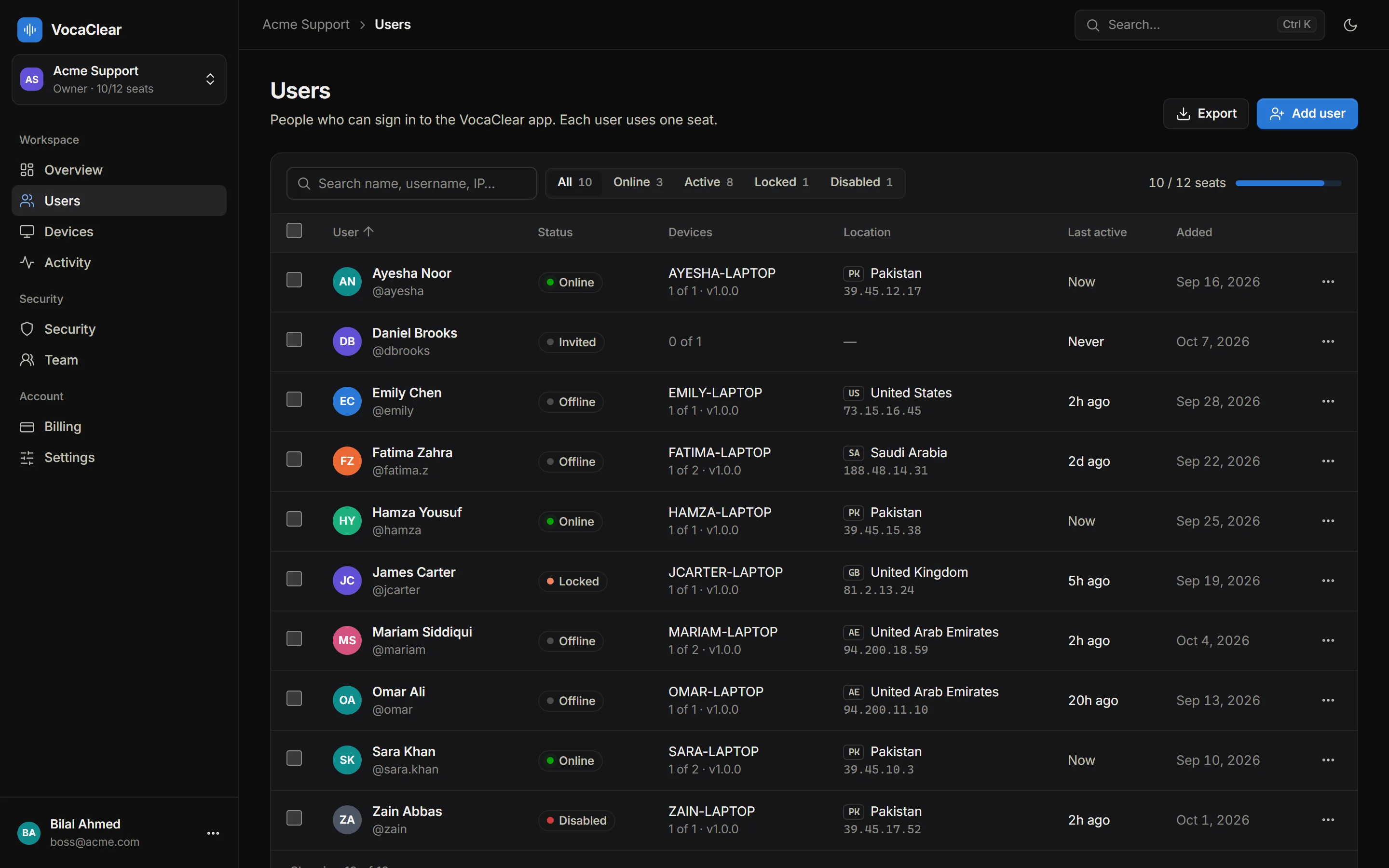
Your dashboard at dash.vocaclear.com gives owners and admins full control over seats, devices and security.

VocaClear dashboard users page listing team members with status, device, location and last activity

Overview & analytics

Daily active users, sign-ins, seats used and who's online right now.

User management

Add, edit, disable or delete users one at a time or in bulk, with search and filters.

Device control

Every licensed PC with its location. Revoke one device or reset all of a user's devices.

Activity log

Every sign-in and change with IP address and country. Filter, search and export to CSV.

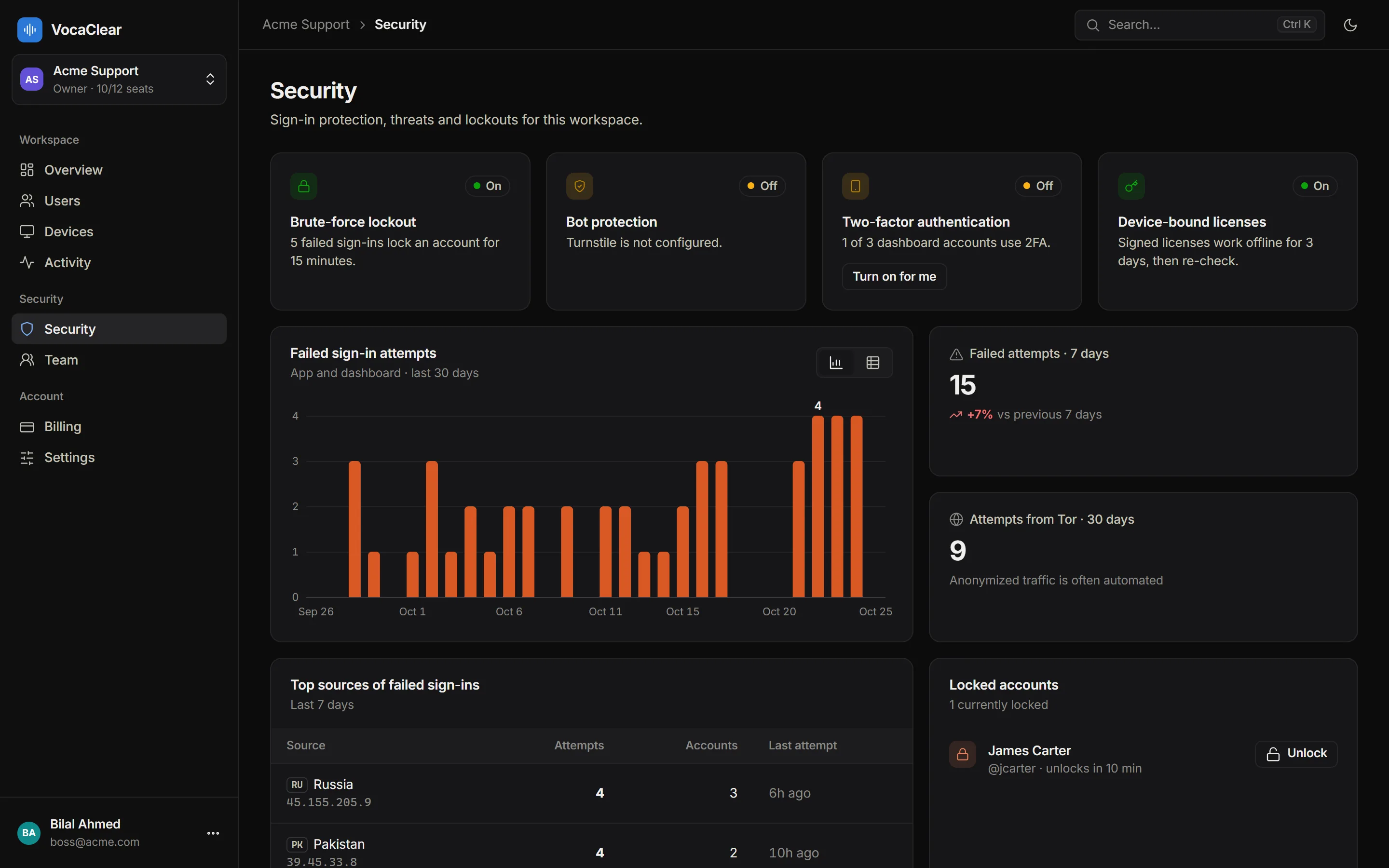
Security center

Failed sign-in attempts over time, where they come from, and which accounts are currently locked.

Team roles

Invite teammates to the dashboard as owners, admins or read-only viewers.

Security & privacy

Your voice stays on your PC

VocaClear never uploads, records or stores audio. Noise cancellation happens on the computer you're speaking into.

Your audio

  • Processed locally, in real time
  • Never uploaded, recorded or stored
  • Works offline for 3 days after sign-in

Your accounts

  • Two-factor authentication
  • Lockout after 5 wrong passwords
  • Bot protection on sign-up and sign-in
  • Signed, device-bound licenses
  • Instant revoke for people and devices
VocaClear security center showing failed sign-in attempts, top attacking IP addresses and locked accounts
Use cases

Clear audio for every kind of team

Remote & hybrid teams

Home offices are full of noise you can't control: family, deliveries, construction next door, the dishwasher. VocaClear keeps all of it out of the meeting, so remote employees sound as professional as they would in a quiet office.

Call & support centers

Open-plan floors put dozens of conversations in the same room. Noise cancellation reduces the murmur around each agent, so customers hear the person they're talking to and calls stay shorter and calmer.

Sales teams

First impressions happen on calls now. Clean audio on every demo and discovery call, whether reps are on the road, in a café or at a shared desk.

Online teaching & tutoring

Students learn better when they can hear clearly. Tutors and teachers can run lessons from anywhere without traffic or household noise getting in the way.

Clinics & telehealth

Front desks and shared clinic rooms are rarely quiet. VocaClear helps staff sound clear on patient calls, and because audio is processed on the PC, it's never sent to us.

Creators & recordings

Record cleaner voice-overs, screen recordings and podcasts without a treated room. VocaClear works with recording apps like OBS Studio and Audacity.

System requirements

What you need

Operating system
Windows 10 or Windows 11, 64-bit
Processor
ClarityMax: modern multi-core CPU with AVX. FeatherLite: almost any PC.
Virtual microphone
VB-CABLE by VB-Audio, installed separately (needs admin rights once per PC).
Internet
Needed to sign in. The app then works offline for up to 3 days at a time.
Meeting apps
Any app that lets you choose a microphone.
Dashboard
Any modern browser.

Ready to sound like you're in a studio?

Start your free 7-day trial with 2 seats. No credit card required.